You want to become a pixel artist, right?
And create stunning pixel art for your games, designs and illustrations?
Well, here is a perfect course for you.
Get the courseSaleDiscounted on Udemy right now
- Bestseller
- Highest Rated
- Premium
Pixel Art Mastery Course: Beginner To Pixel Art Professional
Create professional pixel art and game art in Aseprite for Platformer, First-Person, RPG, and Isometric games & designs!
- 97 video lessons
- 7.5 h on-demand video
- 111 downloadable resources
- Lifetime access
SaleDiscounted on Udemy right now
On Udemy Personal Plan or Udemy Business? The course is included, so you can start today at no extra cost.
Trusted by Students Around the World
570+ five-star reviews on Udemy
Okay, so I'm totally new to pixel art and this course made it so easy to jump in. I'm making sprites I never thought I could - and I'm only at the beginning of the course! The instructor's pretty chill and explains stuff like you're both just hanging out. Super cool.
Alex
Udemy studentThe lecturer’s teaching style is excellent! There is not too much theory; the focus is mainly on practice and on accepting mistakes to help learners improve their ability to learn from them. Thank you, teacher!
Huu
Udemy student · Sep 2026The instructor clearly explains concepts of pixel art in a way that is easy to understand. The class is both informative and enjoyable. I would recommend this class for anyone wishing to understand this amazing art form.
Mark
Udemy student · Jul 2026Im a beginner in pixel art, literally, im a vet (I really enjoy learning new skills and I always wanted to learn digital art), and this course is amazing, I lost the fear to aspirate, and I feel incredible when y finish the exercises. this learning style is my favorite, practice, practice and practice <3
ana P.
Udemy student · Jul 2026Great course, I feel it covers pretty much all your bases for starting with pixel art and being able to use aseprite and get good at it.
José L.
Udemy student · Apr 2026The Course is short but points all the main topics , gives you a very good foundation and start on pixel art and it´s real about time and commitment to be good.
Guilherme S.
Udemy student · Apr 2026The best part always for me is practice! I was looking for courses for pixel art and this is what I was looking for. Thank you! :)
EfektywnyGracz
Udemy student · Jan 2026my personal experience is brilliant, step by step instructions, steady and short, the shorter the clip, I roughly half way through the course and the attention to detail with 2D pixel art is really good.
Aaron
Udemy student · Jan 2026Amazing Course for understanding of pixel art. Animation lessons are really detailed and knowledgeable. Good explanation on perspective, animation, Isometric art and parallax. Good stater pack for pixel art and game art, the concepts are explained from basics to advanced which made you ready for explore advance things in pixel art.
Leena
Udemy student · Jan 2026
Become a Pro Pixel Artist, Quick and Simple
With step-by-step lectures and a wealth of over a hundred downloadable resources, this course will take you from pixel art newbie to pro, quickly and effortlessly.
At the end of this course, you’ll have the skills to create professional pixel art for real-world use.
You’ll be fully equipped to use your art in your games and creative projects, sell your art, join a creative team, or start freelancing!
Start learningGeorge, Udemy student“I am a programmer with 0 art experience … Freaking awesome stuff if you're a total beginner looking to make art for video games.”
Master Pixel Art With 100% Confidence
The course is carefully crafted to strike a perfect balance between technical skill-building and creative expression in pixel art. It’s a perfect recipe for your pixel art mastery.
The course will teach you everything you need to start creating stunning pixel art for Platformer, First-Person, RPG, and Isometric style games and illustrations.
Become a pixel artistLeena, Udemy student“Good explanation on perspective, animation, Isometric art and parallax.”
Pixel Art Mastery Without the Grind
Get instant access to all the tools you need: custom assets, ready-to-use palettes, and worksheets that make learning pixel art straightforward and fun!
Plus, I’ll be there to help you every step of the way, making sure your path to becoming a pixel art pro is smooth and hassle-free.
Check the courseMikko, Udemy student“The downloadable resources, instructor explanations, just make this course one of the best priced courses I've had the pleasure of purchasing!”
Support That’s Got Your Back
If you need a hand or get stuck along the course, no problem! I’m here to help you in any way possible. Just reach out anytime for my support!
Get the courseSandra, Udemy student“Roman answers all questions and not only quickly but also in a friendly way.”
What’s Inside?
- 97 (and counting!) straightforward video lessons: jump right in with step-by-step tutorials that make learning pixel art simple and fun!
- Premium instructor support if you ever get stuck.
- Lifetime access to all new lectures and bonuses!
Anakin, Udemy student“…the module where we go through animating the entire platformer with parallax effect is absolutely brilliant!”
The Pixel Art Mastery Course Is Perfect For:
Indie Game Developers
Who want to create the art that’ll make their games stand out.
Beginner Pixel Artists
Who want to start their pixel art journey with step-by-step guidance.
Graphic Designers
Who want to add pixel art to their design skills and open new doors.
Beginner Artists
Who want to get into digital art in the fastest and simplest way possible.
Illustrators
Who want to make their illustrations pop with pixel techniques.
97 Lessons, Step by Step
From your first line in Aseprite to complete game mockups in four styles. Here’s every section and lesson in the course.
01Welcome! And Let's Get Started!4 lessons
- What You'll learn In This Course
- How To Pixel Art Like a Pro: The Top 3 Must-Know Rules
- SPECC: A Simple Method I Wish I Knew When I Started
- How Long Does It Take To Learn Pixel Art?
- Welcome! And Let's Get Started Quiz
02Mastering Aseprite3 lessons
- Our Course Toolbox
- Aseprite Tools & Layers
- Aseprite Colors and Settings
03Crafting Stunning Pixel Art Sprites: The Workflow6 lessons
- The Workflow Overview
- Shapes
- Outlines and Contours
- Colors
- Shading
- Lighting and Details
- The Pixel Art Workflow Quiz
04Mastering Outlines and Contours2 lessons
- Practicing Straight Lines
- Curved Lines and 3 Critical Mistakes Everyone Makes
05Mastering Shapes3 lessons
- Introduction To 2D and 3D Shapes
- Practicing 2D Geometric Shapes
- Practicing 3D Geometric Shapes
06Mastering Colors6 lessons
- Introduction To Colors
- What Makes Up a Color?
- How Do Items Get Colors?
- Color Models And Why They Matter?
- The 4 Color Wheels You Should Know
- 4 Tips To Design a Great Color Palette
- Mastering Colors Quiz
07Mastering Shading And Lighting6 lessons
- Introduction To Shading and Lighting
- Shading and Lighting a Cube
- Shading and Lighting a Sphere
- Shading and Lighting a Cylinder
- Shading and Lighting a Pyramid
- Shading and Lighting a Cone
08Mastering Details1 lesson
- Adding a Final Touch: Details and Anti-Aliasing
09Mastering Natural Pixel Art: Fire, Wind, Earth, and Water15 lessons
- The Art of Flames: Mastering Fire In Pixel Art
- Let's Draw a Simple Camp Bonfire
- Level Up! Drawing a Bigger Bonfire
- Bonfire Challenge!
- Let's Draw a Fireball For Rocket Launcher
- Beyond The Basics: Drawing a Universal Fireball!
- Reinforcing The Fire Mastery: Fireball Challenge!
- Mastering Water Basics for Platformer Games
- Advanced Water Techniques for Top-Down RPG Games
- Taking Your Skills Up In The Sky: Drawing Clouds!
- Crafting Ground and Grass for Platformer Games
- Pixel Puffs: Drawing and Animating Smoke
- Rock On! Crafting Pixel-Perfect Rocks
- Bits and Bushes: Let's Draw Some Stunning Bushes!
- Level Up! Crafting a Tree Out Of a Bush
10Mastering Industrial Pixel Art: Steel, Wood, Concrete, Sand, and Glass6 lessons
- Metal Mastery: Drawing Shiny Metal Plates
- Pixel Plumbing: Crafting Pipes, Angles, Sleeves & Junctions
- Brick By Brick: Let's Build a Concrete Brick Wall!
- Level Up! Sand Brick Wall Challenge!
- Crafting a Pixel-Perfect Wooden Floor
- Mastering Tinted and Transparent Glass
11Bringing Characters Into The Game1 lesson
- Let's Draw RPG and Platformer Characters!
12Pixel Art and Perspectives: A Complete Guide15 lessons
- Introduction to Perspectives
- Aerial and Color Perspectives
- One-Point Perspective
- Two-Point Perspective
- Three-Point Perspective
- Four-Point Perspective
- Dimetric Perspective
- Isometric Perspective
- Trimetric Perspective
- Cabinet Perspective
- Cavalier Perspective
- Military Perspective
- Reverse Perspective
- Photo Perspective
- Perceptive Perspective
13Mastering Tiles, Tilesets and Tilemaps2 lessons
- Introduction To Tiles, Tilesets, And Tilemaps
- Let's Build a Pixel-Perfect Tilemap!
14Time To Build a First-Person Game Mockup!3 lessons
- Let's Prepare the Sprite Set For Our FP Game Mockup
- Let's Add Storytelling, Mood, Focus, and Balance
- Let's Build the First-Person Game Mockup!
- Questions to consider for building a great pixel art composition
- Take Your First-Person Game Mockup To the Next Level!
15Level Up! Let's Build Platformer Game Mockup3 lessons
- Let's Prepare the Sprite Set for Our Platformer
- Let's Add Storytelling, Mood, Focus, and Balance
- Let's Build the Platformer Mockup!
- Let's Bring Your Platformer Game Mockup To Life!
16Mastering RPG Game Mockup3 lessons
- Let's Prepare the Sprite Set For Our RPG
- Let's Add Storytelling, Mood, Focus, and Balance
- Let's Build the RPG Mockup!
17Mastering Isometric Pixel Art6 lessons
- Warming Up With Isometric Pixel Art
- Let's Draw an Isometric Air Conditioner!
- Pixel Soda: Crafting an Isometric Vending Machine
- Mastering Isometric Text Signage
- Signage in Motion: The Art of Isometric Animation
- Level Up! Isometric Sprites Challenge!
18Time To Build an Isometric Game Mockup!3 lessons
- Let's Prepare the Sprite Set
- Let's Add Storytelling, Mood, Focus, and Balance
- Let's Build the Isometric Game Mockup!
19Let's Build Game Menu UI!1 lesson
- Game Menu UI Challenge!
20Mastering Animation7 lessons
- Let's Learn Animation Basics First
- Let's Animate Our Sage!
- Level Up! Four-Side Walking Animation
- Let's Animate Like a Pro: Advanced Techniques
- Study the Animated Sage Inside the RPG Mockup
- Extra Smooth: Sub-Pixel Animation
- Mastering Parallax Animation
- Let's Build Parallax Animation!
- More Parallax Animation Ideas!
- Animation Quiz
21What's Next?1 lesson
- What's Next?
Your Exclusive Bonuses
- Bonus One – 48 Downloadable Pixel Art Sprites & Sets: begin each lecture with ease, using ready-made references and palettes to quickly get up to speed and start creating with confidence!
- Bonus Two – 34 Easy-to-Follow PDF Guides & Checklists: keep these handy for quick access to best practices and tips.
- Bonus Three – 29 Practical Worksheets: hone your pixel art craft with ready-made worksheets, and accelerate your journey to pixel art professional.
Meet Your Instructor
I’m Roman. I’ve been creating and teaching game art for years.
I’ve guided over 9,000 students across my courses and platforms, many of whom have launched successful careers and indie game studios.
Today I’m finally bringing my pixel art course here, to cultivate the next generation of industry-ready pixel art professionals.
Do you want to become one of them? Go ahead and claim your spot, click the enroll button now, and I’ll see you inside the course!
Enroll now
My Promise To You
Complete the course, tackle every project, and you’ll have the skills to create professional pixel art for real-world use.
You’ll be fully equipped to use your art in your games and creative projects, sell your art, join a creative team, or start freelancing.
If for some reason you’re unhappy with the course, just apply for a refund and get your money back.
And you’ll still get to keep all the course bonuses as my way of thanking you for giving the course a try.
Become a pixel artistFrequently Asked Questions
Do I need any drawing or pixel art experience?
No. The course starts from zero — the tools, the basic workflow and simple shapes — and builds up to full game mockups. All you need is a computer with a mouse and keyboard.
What software does the course use?
Everything is taught in Aseprite, the most popular pixel art editor for games. The techniques (outlines, shading, color palettes, perspective, animation) transfer to any pixel art tool.
How long does it take to learn pixel art?
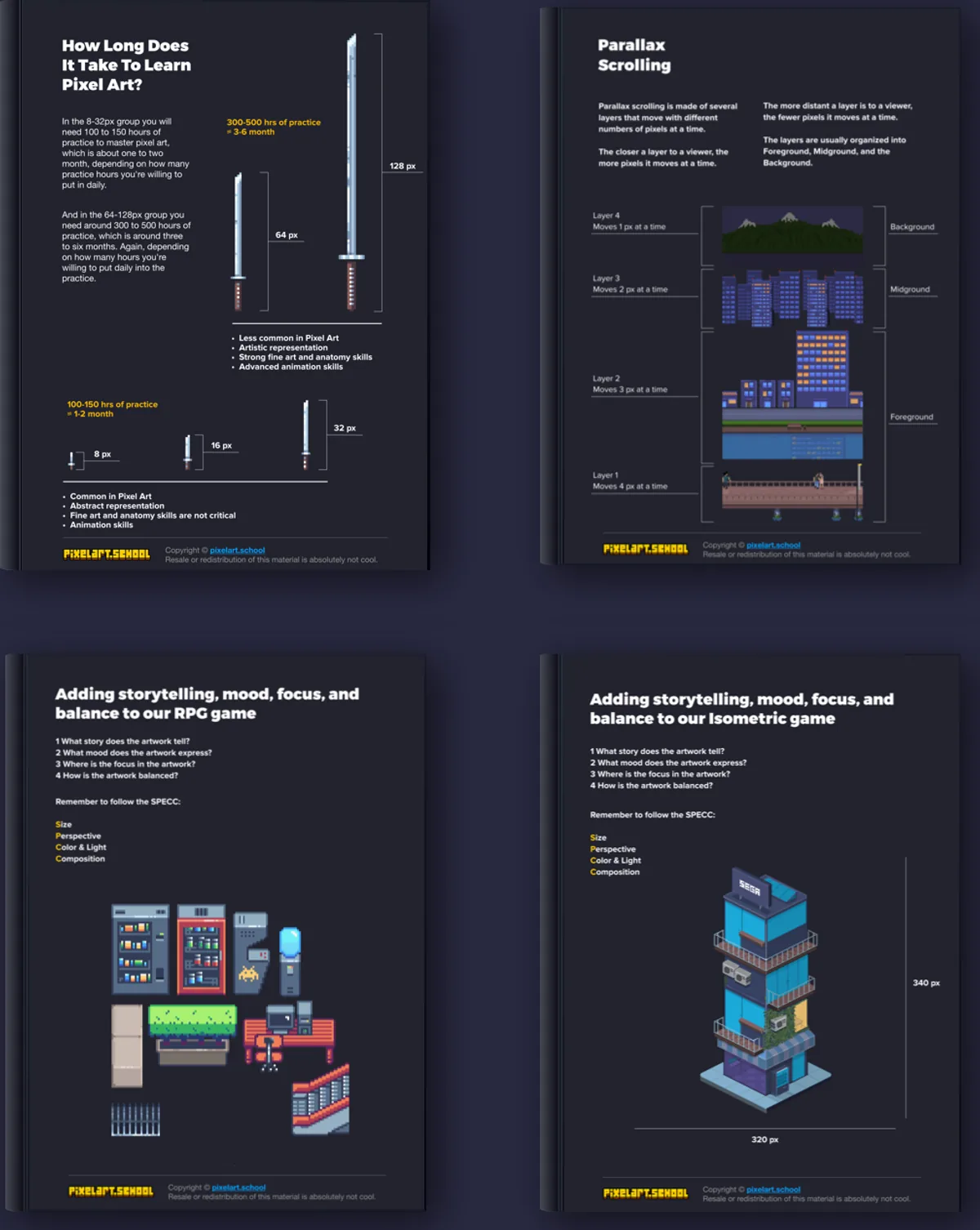
For small sprites (8–32 px) plan on roughly 100–150 hours of practice, about 1–2 months. For larger 64–128 px art, around 300–500 hours, about 3–6 months, depending on how much you practise each day.
What will I be able to make after the course?
Professional pixel art for platformer, first-person, RPG and isometric games: sprites, tilesets, environments, characters, game menu UI, animation and parallax backgrounds. You build a complete game mockup in each of the four styles.
How long is the course?
97 video lessons (7.5 hours), plus 48 downloadable sprite sets, 34 PDF guides and checklists, and 29 practice worksheets. You get lifetime access, including future lessons.
Is it included in Udemy Personal Plan or Udemy Business?
Yes. It is a Udemy Premium course, so if you have Udemy Personal Plan or your company provides Udemy Business, you can start it at no extra cost.
Does the course have subtitles?
Yes: English, German, Spanish.
What if the course isn’t right for me?
Under Udemy’s refund policy, eligible course purchases can be refunded within 30 days (Udemy may decline requests if much of the course was already watched or downloaded). And you keep all the course bonuses as a thank-you for giving it a try.
Can I get help if I get stuck?
Yes. Ask questions right inside the course and Roman answers personally — support is part of the course.